
Introduction
In today’s digital world, creativity and technology are moving together faster than ever before. Creating high quality images once required professional design skills, expensive software, and a lot of time. But now, thanks to artificial intelligence, anyone can create stunning visuals within seconds. This is where the AI image generator tool plays a powerful role.
From bloggers and marketers to designers and business owners, everyone is using AI powered tools to generate images quickly and efficiently. An AI image generator tool is not just a creative solution it has also become a strong opportunity for online income and passive earnings.
In this blog, we will explore everything you need to know about an AI image generator tool: what it is, how it works, how to create one, and how you can earn money from it.
What Is an AI Image Generator Tool?
An AI image generator tool is a software or web-based application that uses artificial intelligence and machine learning models to create images automatically. These images are generated based on user input, such as a text prompt or a reference image.
For example, if a user types:
“A futuristic city with flying cars at night”
The AI image generator tool understands the request and creates a unique image matching that description.
Unlike traditional graphic design tools, an AI image generator tool does not require manual designing. The AI model has already learned from millions of images and patterns, allowing it to generate new visuals creatively and intelligently.
Why AI Image Generator Tools Are So Popular
The popularity of the AI image generator tool is growing rapidly because-
- No design skills are required
- Images are generated within seconds
- Cost is much lower than hiring designers
- Unlimited creative possibilities
- Useful for blogs, ads, social media, and branding
This is why AI image generator tools are now used by-
- Bloggers
- Digital marketers
- Social media creators
- YouTubers
- Startups and businesses
How Does an AI Image Generator Tool Work?
Understanding how an AI image generator tool works will help users trust it more and creators explain it better.
Step 1. User Input (Prompt)
The process starts when a user enters a text prompt or uploads an image. The prompt describes what kind of image the user wants.
Example:
“A realistic portrait of a businesswoman working on a laptop”
Step 2. Prompt Processing
The tool analyzes the prompt and breaks it into keywords such as:
- Subject
- Style
- Colors
- Mood
- Background
This step helps the AI understand the exact requirement.
Step 3. AI Model Processing
Most AI image generator tools use advanced models like:
- Diffusion models
- Stable Diffusion
- Transformer based neural networks
The AI model matches the prompt with patterns it learned during training on large image datasets.
Step 4. Image Generation
Instead of creating the image instantly, the AI:
- Starts with random noise
- Slowly refines shapes, colors, and details
- Improves the image step by step
This process happens in seconds but involves thousands of calculations.
Step 5. Final Output
Once the image is ready, it is displayed on the screen. The user can:
- Download the image
- Regenerate a new version
- Upgrade for HD or watermark-free images
This is how an AI image generator tool delivers fast and high-quality results.
How to Build an AI Image Generator Tool
Creating an AI image generator tool may sound complex at first, but in reality, it becomes much easier when you break the process into simple steps. You don’t need to be a hardcore AI scientist to start—many successful tools are built using existing AI models and smart integration.
Let’s understand the full process clearly.
Step 1: Understand the Purpose of Your AI Image Generator Tool
Before writing any code, ask yourself one simple question:
Why are you building this AI image generator tool?
Your goal could be:
- To help users create images from text prompts
- To build a creative tool for bloggers and marketers
- To create a passive income source
- To launch a SaaS-style AI product
Having a clear purpose helps you decide features, design, and monetization later.
Step 2: Choose the Type of AI Image Generator Tool
Not all AI image generator tools are the same. You must choose what type you want to build.
Common options include:
- Text-to-Image Generator (most popular)
- Image-to-Image Generator
- AI Art or Anime Generator
- Logo or Thumbnail Generator
Best option for beginners:
A Text-to-Image AI Image Generator Tool, because it has high demand and is easier to monetize.
Step 3: Use an Existing AI Model or API (Smart Choice)
Training your own AI model requires huge data, powerful GPUs, and high costs. Instead, smart developers use AI image generation APIs.
Popular choices:
- Stable Diffusion–based APIs
- OpenAI image generation APIs
- Replicate or Hugging Face models
These APIs work like this:
You send a text prompt → the API generates an image → you display it to the user.
This approach saves time, money, and effort.
Step 4: Decide Your Tech Stack (Simple & Effective)
You don’t need fancy technology to start.
Frontend (User Interface):
- HTML, CSS, JavaScript (basic)
- React or Next.js (professional & scalable)
- Tailwind CSS for clean design
Backend (Logic & API handling):
- Node.js with Express
- Python with Flask or FastAPI
- PHP (for simple setups)
Hosting:
- VPS hosting (DigitalOcean, Hostinger VPS, Contabo)
- Frontend hosting like Vercel (optional)
The backend connects your website to the AI image generator API.
Step 5: Create the Core Workflow
The heart of your AI image generator tool is its workflow.
A simple flow looks like this:
- User enters a text prompt
- Prompt is sent to your backend server
- Backend sends the prompt to the AI API
- AI generates an image
- Image is returned and shown to the user
This clean flow ensures speed and good user experience.
Step 6: Design a Clean and User-Friendly Interface
People love simple tools.
Your AI image generator tool should have:
- A clear prompt input box
- A “Generate Image” button
- A loading animation
- Image preview section
- Download button
A clean UI builds trust and encourages users to return.
Step 7: Add Usage Limits to Control Cost
AI APIs cost money, so you must control usage.
Smart strategies:
- Allow free users 2–3 images per day
- Require login after free limit
- Offer premium plans for unlimited usage
This step is crucial if you want long-term sustainability.
Step 8: Store or Cache Generated Images (Optional)
You can:
- Temporarily store images for logged-in users
- Allow users to download images anytime
- Delete images after a fixed time to save storage
This improves user experience without increasing cost too much.
Step 9: Test, Optimize, and Improve
Before launching publicly:
- Test image quality
- Check speed
- Fix bugs
- Improve prompt handling
User feedback will help you improve the AI image generator tool step by step.
Step 10: Launch and Scale Gradually
Start small:
- Launch a free version
- Collect users
- Analyze behavior
- Add premium features
- Improve performance
Many successful AI image generator tools started simple and scaled over time.
Final Thought
Building an AI image generator tool is not just about technology—it’s about solving a real problem in a simple way. When users feel that your tool saves time, effort, and money, they naturally come back.
With the right idea, clean design, and smart monetization, your AI image generator tool can grow into a powerful platform that creates value for users and passive income for you.
If you want, next I can help you with:
- sample workflow diagram explanation
- code structure (no heavy coding)
- pricing page content
- SEO optimisation for the tool
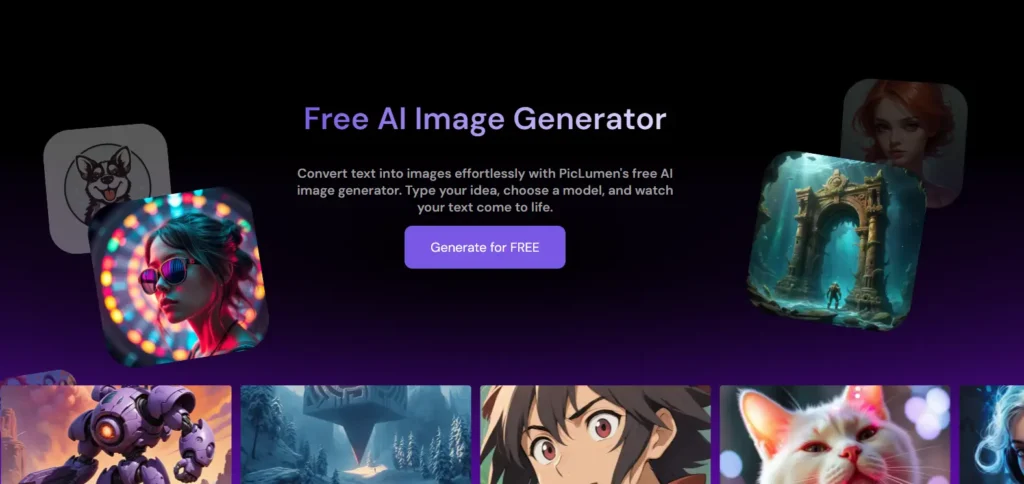
Here is an image given below which you can see and understand how your tool site will be made and you can also visit to this website and see how it works by clicking on this link-
Here is an image given below which you can see and understand how your tool site will be made and you can also visit to this website and see how it works by clicking on this link- AI Image Generator Tool
How to Earn Money from an AI Image Generator Tool
Now comes the most important part earning money.
An AI image generator tool is not just a utility; it is a digital asset that can generate passive income.
1. Display Ads (AdSense & Other Networks)
If your tool is free to use, ads are the easiest income source.
- Show banner or native ads
- Earn money based on traffic
High traffic + free tool = consistent passive income.
2. Premium Subscription Plans
Offer paid plans with advanced features :
- Unlimited image generation
- HD quality downloads
- No watermark
- Faster processing
Even if only a small percentage of users upgrade, income can grow quickly.
3. Credit-Based Model
Users buy image credits instead of subscriptions.
- 1 credit = 1 image
- Simple and flexible system
This model works very well for marketers and designers.
4. Affiliate Marketing
Promote related tools such as:
- Design software
- Print-on-demand platforms
- AI tools and SaaS products
Affiliate income adds extra profit without extra cost.
5. Custom Image Services
Use your AI image generator tool to offer services:
- Logo design
- Social media posts
- YouTube thumbnails
Charge clients per project and earn higher margins.
6. API Access & White Labeling
Once your tool becomes popular:
- Sell API access to developers
- Offer white-label solutions to companies
This is an advanced but highly profitable model.
Why AI Image Generator Tool Is a Long-Term Opportunity
The demand for visual content is increasing every year. Businesses, creators, and marketers all need images daily. An AI image generator tool solves this problem at scale.
With proper SEO, smart monetization, and continuous improvement, one tool can generate income for years with minimal maintenance.
If you want to learn how to create a AI Image generator Tool,Then according to me, Skillgenerator is the best platform for learn this.
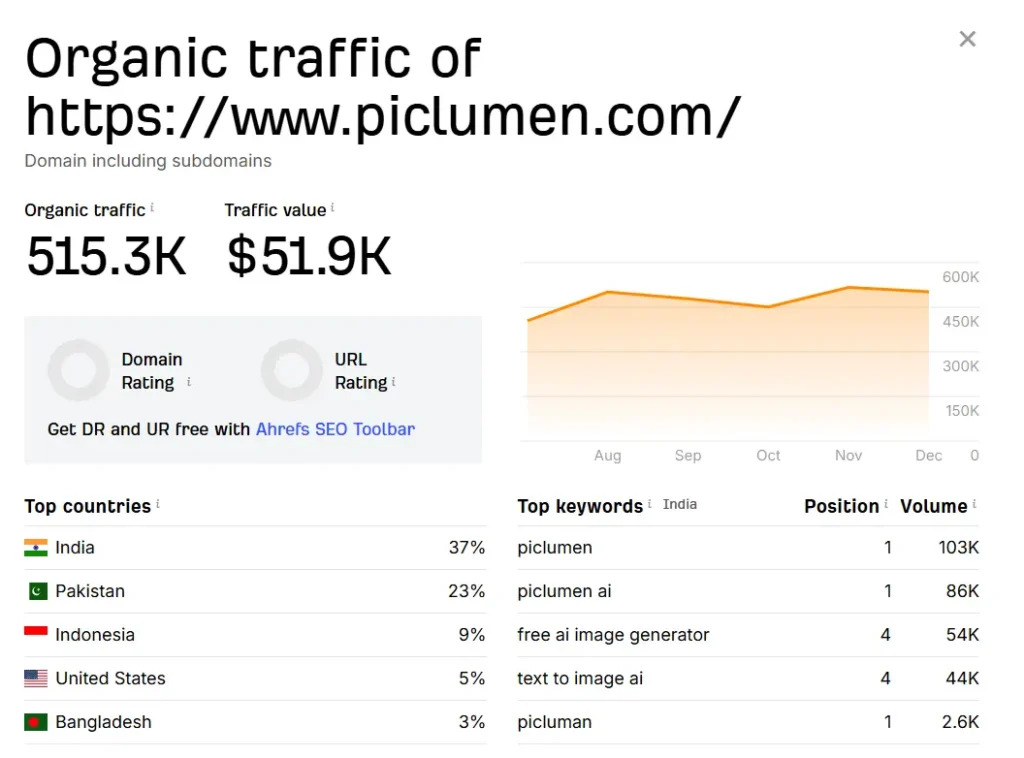
here is a live example through image of earning from AI Image Generator Tool-
Conclusion
An AI image generator tool is no longer just a modern technology trend it has become a real solution for creators, marketers, and businesses who need fast, high quality visuals every day. What once required expensive software and professional design skills can now be done in seconds with the help of AI.
By understanding how an AI image generator tool works, learning how to build one, and applying the right monetization strategies, you can turn a simple idea into a valuable digital asset. Whether you are a blogger, developer, entrepreneur, or someone exploring online income opportunities, this tool opens the door to creativity, automation, and long-term growth.
The key to success lies in keeping the tool simple, user-friendly, and ethically responsible. When users trust your platform and enjoy the experience, they return—and that is where real passive income begins.
As demand for visual content continues to rise, the role of AI in creative work will only grow stronger. This makes an AI image generator tool one of the smartest and most future-proof projects you can start today. If you act now, you won’t just follow the future of digital creativity you’ll help shape it.
