
Introduction
This is where an Image Compressor Tool becomes extremely important. Whether you are a blogger, developer, digital marketer, or website owner, an image compressor tool helps you reduce image size without losing visible quality improving speed, SEO, and user experience at the same time.
In today’s fast-paced digital world, website speed and performance matter more than ever. Users expect websites to load instantly, and search engines like Google reward fast websites with better rankings. One of the biggest reasons for slow websites is heavy and unoptimised images.
In this blog, you will learn what an image compressor tool is, how it works, how to create one, its features and benefits, and most importantly, how to earn passive income from it.
What Is an Image Compressor Tool?
An image compressor tool is an online or offline utility that reduces the file size of images while maintaining acceptable visual quality. It removes unnecessary data from images so they load faster and consume less storage and bandwidth.
For example, a 4MB image can often be compressed to under 400KB using a good image compressor tool, with almost no visible quality difference.
Popular image formats supported by an image compressor tool include:
- JPG / JPEG
- PNG
- WEBP
- GIF
How Does an Image Compressor Tool Work?
An image compressor tool works in a few simple but powerful steps :
1. Image Upload
The user uploads an image from their device or drags and drops it into the tool.
2. Compression Algorithm
The tool applies compression logic:
- Lossy compression removes non essential data (best for web use).
- Lossless compression optimises data without quality loss.
3. Image Optimisation
The image is resized, metadata is removed, and the file is optimised for faster loading.
4. Download Output
The user downloads the compressed image with a much smaller file size.
Many modern tools also convert images into WEBP format, which is recommended by Google for performance (learn more from Google PageSpeed Insights).
How to Create an Image Compressor Tool
Creating an image compressor tool may sound technical at first, but once you break it into clear steps, it becomes surprisingly manageable. Think of it like building a small factory the frontend is where users interact, the backend is where the real work happens, and hosting & performance ensure everything runs fast and smoothly.
Let’s explain each part in a more human and practical way.
1. Frontend (User Interface) – What Users See & Feel
The frontend is the face of your image compressor tool. This is where users upload images, adjust settings, and download results. A clean, simple interface builds trust and keeps users coming back.
What You Need and Why It Matters
HTML (Structure)
HTML creates the basic layout :
- Upload button
- Drag and drop area
- Compression slider
- Download button
Without good structure, even the best tool feels confusing.
CSS (Design & Experience)
CSS makes your tool look professional and user-friendly.
- Dark or light theme
- Proper spacing and fonts
- Mobile-friendly layout
A visually pleasing design makes users stay longer and use the image compressor tool more often.
JavaScript (Interaction & Logic)
JavaScript brings everything to life:
- Image preview before compression
- File size comparison (before vs after)
- Compression level control
- Progress indicator while processing
Small details like live previews and drag-and-drop significantly improve the user experience.
2. Backend (Compression Engine) – The Brain of the Tool
The backend is where actual image compression happens. Users don’t see this part, but it’s the most important one.
Choosing a Backend Language
You can choose any backend based on your comfort :
Python
- Easy to learn
- Powerful libraries like Pillow and OpenCV
- Great for beginners and scalable projects
Node.js
- Very fast and efficient
- Libraries like Sharp and Imagemin
- Perfect for modern web apps
PHP
- Works well with shared hosting
- Libraries like GD and Imagick
- Easy integration with traditional websites
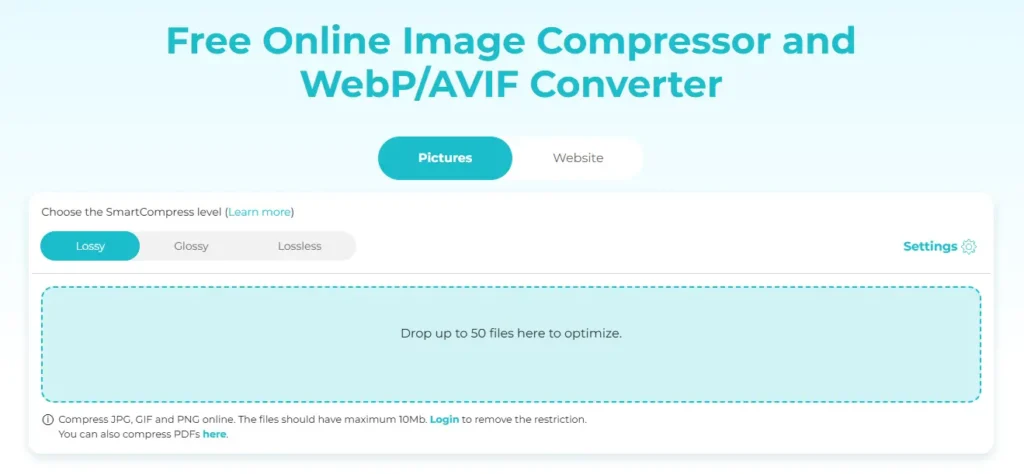
Here is an image given below which you can see and understand how your tool site will be made and you can also visit to this website and see how it works by clicking on this link- Image compressor tool
How Backend Compression Works
- The user uploads an image
- The server receives the file
- Compression logic is applied (lossy or lossless)
- Metadata is removed
- The image is optimised and compressed
- The compressed image is sent back for download
This entire process usually happens in just a few seconds.
3. Hosting & Performance – Speed, Security, and Trust
Even the best image compressor tool will fail if hosting is slow or unreliable.
Hosting Choice
VPS or Cloud Hosting is recommended because :
- Better processing power
- Faster image compression
- Handles multiple users at once
Shared hosting may work initially, but it often struggles with heavy image processing.
Cloudflare CDN – Why It’s Important
Using Cloudflare CDN helps in:
- Faster loading worldwide
- Protection from spam and abuse
- Reduced server load
- Better uptime and security
It also improves SEO because Google prefers fast and secure websites.
Privacy & Auto-Delete System
User trust is critical. That’s why you should:
- Auto-delete uploaded images after download
- Remove files after a fixed time (e.g., 10–30 minutes)
- Clearly mention privacy policy
This makes users feel safe using your image compressor tool.
Key Features of an Image Compressor Tool
A good image compressor tool should include :
- Drag & drop image upload
- Compression level control
- Before & after file size preview
- Support for multiple image formats
- Bulk image compression
- Fast download option
- Mobile-friendly interface
Advanced tools also offer:
- PNG to WEBP conversion
- Image resizing
- API access for developers
How to Earn Money from an Image Compressor Tool?
An image compressor tool is not just a free utility for users if monetised the right way, it can become a reliable and long-term income source. The key is to understand user intent and offer value without ruining their experience.
Let’s break down each monetisation method in a more human, realistic, and easy to understand way.
1. Google AdSense – Passive Income from Traffic
The simplest way to earn money from an image compressor tool is by displaying Google AdSense ads.
Most users who search for terms like “compress image online” or “reduce image size” already have a strong intent. They land on your tool, use it, and spend time on the page which increases ad impressions and clicks.
Why AdSense Works Well Here
- Tool-based traffic is highly targeted
- Users often compress multiple images
- High page engagement = better RPM
You don’t need to push ads aggressively. Even a few well-placed ads can generate consistent passive income once traffic grows.
2. Affiliate Marketing – Earn While Helping Users
Affiliate marketing works best when it feels natural and helpful, not forced.
People using an image compressor tool are usually:
- Website owners
- Bloggers
- Designers
- Digital marketers
That means you can ethically promote tools they already need.
Best Affiliate Ideas
- Web hosting services (for faster websites)
- Design tools (for image editing & creation)
- SEO software (to improve rankings)
For example, you can guide users with helpful resources like Canva for Designers or recommend reliable hosting platforms for image-heavy websites. When users click and purchase, you earn a commission — simple and scalable.
3. Premium Plans – Turn Free Users into Paying Customers
While most users are happy with free compression, power users are willing to pay for advanced features.
What You Can Offer in a Paid Plan
- Bulk image compression
- High-quality lossless compression
- Faster processing
- Ad-free experience
- API access for developers
This transforms your image compressor tool into a mini SaaS product. Even a small monthly fee from a limited number of users can create a strong, predictable income stream.
4. Sponsored Tools & Links – Monetise Authority
Once your image compressor tool starts receiving regular traffic, brands will see value in your platform.
Companies related to:
- Hosting
- Design software
- Marketing tools
may pay you to feature their tool, link, or banner on your site.
Because your audience is highly relevant, sponsors are often willing to pay higher rates than normal display ads. This works especially well when your tool is trusted and frequently used.
Final Thought
Earning money from an image compressor tool is not about forcing ads everywhere, it’s about matching the right monetisation method with the right audience.
Start with AdSense, add affiliate links naturally, introduce premium features for power users, and finally leverage sponsored partnerships. Over time, your image compressor tool can evolve into a strong passive income asset that earns money while you focus on growing traffic or building more tools.
How to Make Image Compressor Tool a Passive Income Source?
To turn your image compressor tool into passive income, follow these steps:
- Create SEO-optimised blog content targeting keywords like image compressor tool
- Rank on Google for long-tail keywords
- Automate compression and downloads
- Add ads and affiliate links
- Let traffic + automation do the work
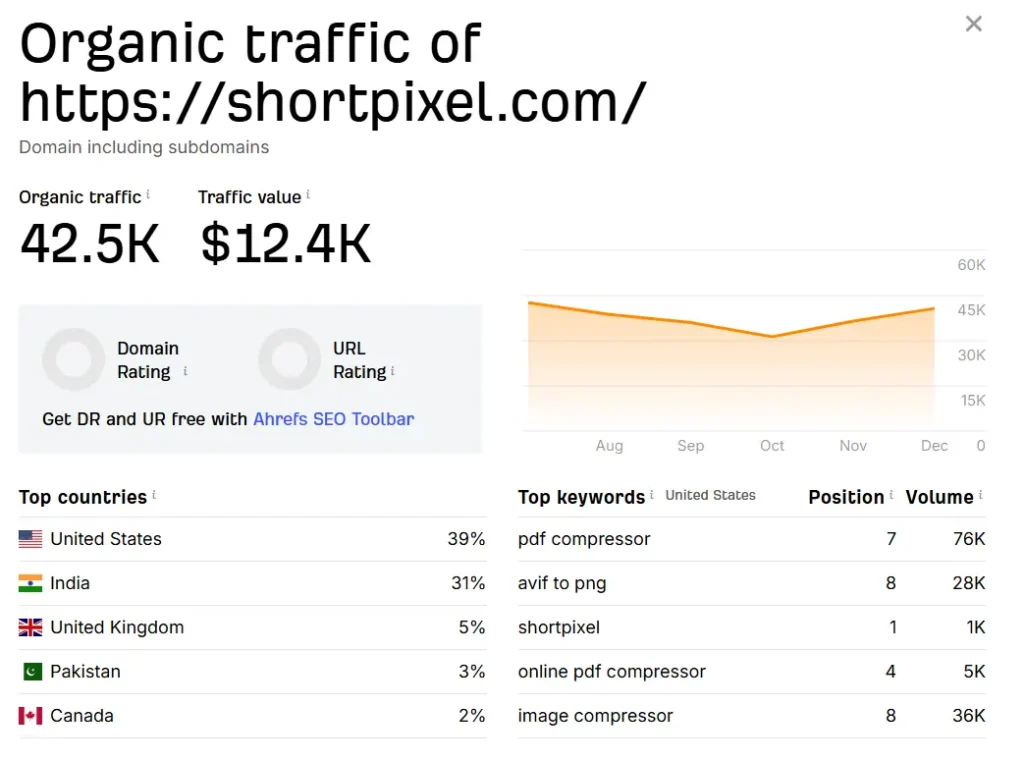
Once ranked, the tool keeps earning 24/7 without daily effort.
If you want to learn how to create a Image compressor Tool,Then according to me, Skillgenerator is the best platform for learn this.
here is a live example through image of earning from Image Compressor tool Tool-
Conclusion
An image compressor tool is much more than a simple online utility it’s a smart digital asset with real long term value. By reducing image size, it helps websites load faster, boosts SEO performance, improves user experience, and cuts down storage and bandwidth costs. In a world where speed and performance directly impact rankings and revenue, this makes an image compressor tool extremely powerful.
What makes it even more attractive is its earning potential. With the right combination of useful features, SEO focused content, and smart monetisation methods like ads, affiliate marketing, and premium plans, an image compressor tool can easily turn into a reliable passive income source. Once it starts ranking on search engines, it continues to attract users daily without constant effort.
Whether you are a beginner exploring your first online project or an experienced developer looking to build scalable tools, creating and promoting your own image compressor tool is a future proof decision. Build it with care, optimise it properly, and let your image compressor tool work for you bringing value to users and income to you, even while you sleep.
