

In today’s fast moving digital world, businesses are no longer dependent on paper bills or manual spreadsheets. Everything is shifting toward automation, speed, and professionalism. One such powerful yet underrated solution is an Invoice Maker Tool.
Whether you are a freelancer, startup founder, developer, or someone planning to build and sell online tools, creating your own Invoice Maker Tool or Gst Invoice Generator Tool can be a smart move. It solves a real-world problem, has constant demand, and opens multiple income opportunities.
In this detailed guide, we will explore what an invoice maker tool is, how it works, how to build it step by step, its features, benefits, monetization strategies, and its future scope all explained in simple, human language.
I have given a video above in which it has been explained in full detail how to make Invoice Maker Tool. You can watch it by clicking on it or on this link- “Make your own Invoice Maker tool “.
What Is an Invoice Maker Tool?
An Invoice Maker Tool is a digital application or web-based tool that helps users create professional invoices quickly and accurately. Instead of designing invoices manually in Word or Excel, users can simply enter details, and the tool automatically generates a clean, well-structured invoice.
An invoice usually includes:
- Business name & logo
- Client details
- Invoice number & date
- Products or services provided
- Quantity, price, tax, discount
- Total payable amount
- Payment terms and method
In simple words, an invoice maker tool converts business data into a professional bill that can be shared digitally.
How to Make an Invoice Maker Tool?
Creating an Invoice Maker Tool is one of the smartest projects you can build today. It solves a real business problem, is technically manageable even for beginners, and has strong monetization potential.
In this guide, you’ll learn exactly how an invoice maker tool is built, from basic planning to advanced features—explained in simple language, not complex jargon.q2
Step 1: Decide the Type of Invoice Maker Tool
Choose the platform based on your goal:
Option 1: Web-Based Invoice Maker (Best for Beginners)
- Built with HTML, CSS, JavaScript
- Runs directly in the browser
- Easy to deploy and sell
Option 2: WordPress-Based Tool
- Plugin or shortcode-based
- Perfect if you run a WordPress tools website
Option 3: SaaS Invoice Maker
- Login system
- Database storage
- Monthly subscriptions
Recommended start: Web-based invoice maker → later convert into SaaS.
Step 2: Plan the Invoice Structure (Very Important)
Before coding, design the invoice layout.
A standard invoice includes:
- Business logo & name
- Business contact details
- Client name & address
- Invoice number & date
- Item table (name, quantity, price)
- Subtotal, tax, discount
- Final payable amount
- Notes & payment terms
This structure ensures professional and legal clarity.
Step 3: Design the User Interface (UI)
Create a clean and simple interface.
Main UI sections:
- Business Details Form
- Name, logo upload, address
- Client Details Form
- Client name, email, address
- Invoice Items Section
- Item name
- Quantity
- Price
- Add/remove rows dynamically
- Summary Section
- Tax %
- Discount
- Total amount
Keep the UI minimal and beginner-friendly.
Step 4: Build the Invoice Input Form (Logic Foundation)
This is where users enter data.
Your form should:
- Accept text, numbers, percentages
- Validate empty or incorrect fields
- Allow multiple items dynamically
Example logic (conceptual):
- User adds 3 items
- Each item has quantity × price
- System calculates totals in real time
This step turns a simple form into a smart tool.
Step 5: Add Automatic Calculations (Core Brain of Tool)
This is the most important feature.
Your tool must automatically calculate:
- Item total = quantity × price
- Subtotal = sum of all items
- Tax = subtotal × tax %
- Discount (if any)
- Final total = subtotal + tax − discount
Why this matters:
- Removes manual mistakes
- Saves user time
- Makes tool feel “professional”
Real-time calculation is a must-have.
Step 6: Create the Invoice Preview Section
Users should see the invoice before downloading.
The preview should:
- Match the final PDF design
- Update instantly when data changes
- Look exactly like a real invoice
This builds trust and improves user experience.
Step 7: Generate PDF Invoice (Most Important Feature)
PDF generation turns your tool into a real business solution.
Your tool should:
- Convert invoice preview into PDF
- Maintain proper spacing & fonts
- Be print-ready
- Work on mobile & desktop
Without PDF export, your tool feels incomplete.
Step 8: Add Branding & Customization Options
To increase value, allow:
- Logo upload
- Color theme selection
- Font size adjustment
- Custom notes & terms
These small features make users emotionally attached to your tool.
Step 9: Add Invoice Numbering & Date Logic
Every invoice should:
- Have a unique invoice number
- Automatically include today’s date
- Optionally allow custom numbering
This feature is important for accounting and record keeping.
Step 10: Save & Manage Invoices (Advanced but Powerful)
Optional but highly valuable features:
- Save invoice history
- Client-wise invoices
- Download past invoices
- Simple dashboard view
This transforms your tool into a mini billing system.
Step 11: Make It Mobile-Friendly
Most users will use your tool on phones.
Ensure:
- Responsive layout
- Touch-friendly buttons
- Fast loading speed
Mobile usability = more users + better SEO.
Step 12: Add Security & Data Safety
Even simple tools should:
- Avoid storing sensitive data unnecessarily
- Use secure file handling
- Prevent malicious inputs
Trust is critical for financial tools.
Bonus: Features That Make Your Tool Stand Out
If you want to go ahead of competitors:
- No-login invoice generation
- Multi-currency support
- GST/VAT toggle
- Email invoice directly to client
- Payment gateway links
Small features = big competitive advantage.
8 Common Invoice Mistakes Small Businesses Should Avoid (And How to Fix Them)
Why You Should Make Your Own Invoice Maker Tool?
Creating your own invoice maker tool is not just a development project it’s a business opportunity.
Here’s why it makes sense:
- Every freelancer and business needs invoices
- Demand exists in every country and industry
- Simple tool, but high utility
- Easy to monetize
- Perfect for SaaS or digital product selling
If you already run a tools website, this tool can become a traffic
How Does an Invoice Maker Tool Work?
The working process of an invoice maker tool is surprisingly simple:
Step 1. User Inputs Data
The user enters:
- Company or freelancer details
- Client information
- Service or product details
Step 2. Automatic Calculations
The tool automatically calculates:
- Subtotal
- Tax (GST/VAT)
- Discounts
- Final total
This reduces human errors and saves time.
Step 3. Template Formatting
The entered data is placed into a pre designed invoice template that looks professional and business ready.
Step 4. Generate & Export
The invoice can be:
- Downloaded as PDF
- Sent via email
- Shared on WhatsApp
- Stored for future records
Everything happens within minutes.
If you want to learn how to make a Invoice Maker Tool,Then according to me, Skillgenerator is the best platform for learn this And if you want to learn this by watching the video then click on the link given below. Learn how to make- Invoice Maker tool.
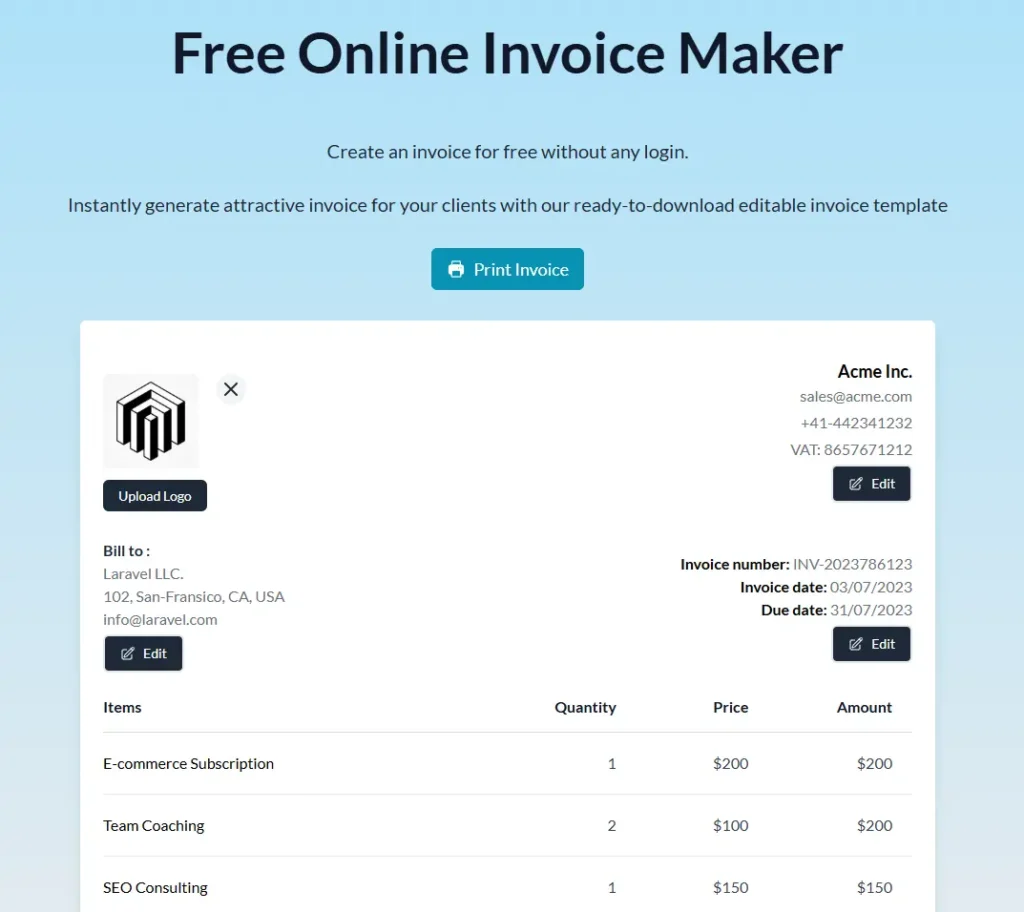
Here is an image given below which you can see and understand how your tool site will be made and you can also visit to this website and see how it works by clicking on this link- invoice maker tool
Key Features of an Invoice Maker Tool
A powerful invoice maker tool should include:
Core Features
- Ready-made invoice templates
- Automatic tax calculation
- PDF download
- Editable invoice fields
Advanced Features
- Logo upload & branding
- Multi-currency support
- GST/VAT options
- Invoice history & dashboard
User Experience Features
- Mobile-friendly design
- Fast loading
- Simple UI for beginners
The easier your tool is, the more users it attracts.
Why Should You Use an Invoice Maker Tool?
Manual invoicing wastes time and increases errors. An invoice maker tool solves these problems instantly.
Main Reasons:
- Saves time
- Looks professional
- Reduces calculation mistakes
- Improves payment clarity
- Builds client trust
For freelancers, it creates a professional impression, even if they are working solo.
Benefits of an Invoice Maker Tool
Let’s break down the benefits in a human way:
1. Time Saving
What took 30 minutes earlier now takes 2 minutes.
2. Professional Branding
Invoices with logo and clean design increase brand value.
3. Faster Payments
Clear invoices reduce confusion and payment delays.
4. Record Keeping
Easy tracking of income and invoices.
5. Scalability
As business grows, the tool grows with it.
How to Earn Money From an Invoice Maker Tool
An Invoice Maker Tool may look simple on the surface, but from a business point of view, it is a high-demand, evergreen money-making digital product. Every freelancer, startup, and small business needs invoices—and that need never ends.
If you build or own an invoice maker tool, you are not just creating software—you are creating a long-term income asset.
Let’s break down all the realistic and proven ways to earn money from an invoice maker tool, explained in a simple and human way.
1. Freemium Model
The freemium model is one of the smartest ways to start earning.
How it works:
- Basic invoice creation → Free
- Advanced features → Paid
Free version may include:
- Limited invoices per month
- Basic template
- Watermark on invoice
Paid version may unlock:
- Unlimited invoices
- Watermark-free PDF
- Logo & branding
- Advanced templates
Why this works:
People first trust your tool by using it free. Once they depend on it, upgrading feels natural.
2. Subscription-Based SaaS (Best for Recurring Income)
This is the most powerful monetization method.
Example pricing:
- $5/month → Freelancers
- $10/month → Small businesses
- $25/month → Agencies
What users get:
- Invoice history
- Client management
- Auto invoice numbering
- Cloud storage
- Priority support
Why it’s powerful:
Even 1,000 users paying $5/month = $5,000 monthly recurring income.
3. Sell Invoice Maker Tool as a Script or Source Code
If you are a developer or tool creator, you can sell the complete invoice maker tool code.
Who buys this?
- Website owners
- Entrepreneurs
- Tool marketplace buyers
How to sell:
- One-time payment ($15–$99)
- Includes full source code + documentation
Best part:
You build once and sell unlimited times.
4. Ads-Based Income (For Free Tools With High Traffic)
If your invoice maker tool is 100% free, you can earn through ads.
How:
- Display ads on the tool page
- Earn per impression or click
Works best when:
- Tool ranks on Google
- Thousands of users visit daily
This model is slow at first but scales well with traffic.
5. Affiliate Marketing Through Invoice Tool
Your tool users are business owners perfect affiliate audience.
You can promote:
- Payment gateways
- Accounting software
- Business tools
- Hosting or SaaS products
Example:
“Want faster payments? Use this payment solution.”
You earn commission per signup or sale, without extra work.
6. Bundle Invoice Maker With Other Business Tools
Instead of selling only one tool, bundle it with:
- Quotation maker
- Receipt generator
- GST calculator
- Expense tracker
Result:
- Higher product value
- Higher pricing
- More conversions
People prefer one solution instead of many tools.
7. Custom Invoice Maker for Clients (Service-Based Income)
You can also sell services using your tool.
Examples:
- Custom invoice system for a business
- White-label invoice maker
- Brand-specific invoice templates
Charge:
- One-time setup fee
- Monthly maintenance fee
This is ideal for freelancers and agencies.
8. White-Label Invoice Maker Tool
White-label means:
- Client uses your tool
- Their branding
- Your backend
You charge:
- Monthly license fee
- Or yearly white-label access
This model works great with:
- Agencies
- Accounting firms
- SaaS resellers
9. Offer Paid Templates & Designs
Some users don’t want features they want beautiful invoices.
You can sell:
- Premium invoice templates
- Industry-specific designs
- Branded invoice themes
Low effort, high profit add-on.
10. Lead Generation for Other Services
Even if users don’t pay directly, you can:
- Collect emails
- Build a business audience
- Promote your own products later
Your invoice maker tool becomes a lead magnet.
Important Tips to Increase Earnings
Keep the tool simple
Focus on speed & reliability
Offer free value first
Build trust before selling
Optimize pages for SEO
Add clear upgrade benefits
People pay when they see real value, not hype.
Realistic Earning Potential
Let’s be practical:
- 5,000 monthly users
- 3% convert to paid
- 150 paid users × $10/month
$1,500/month recurring income
And this grows every month.
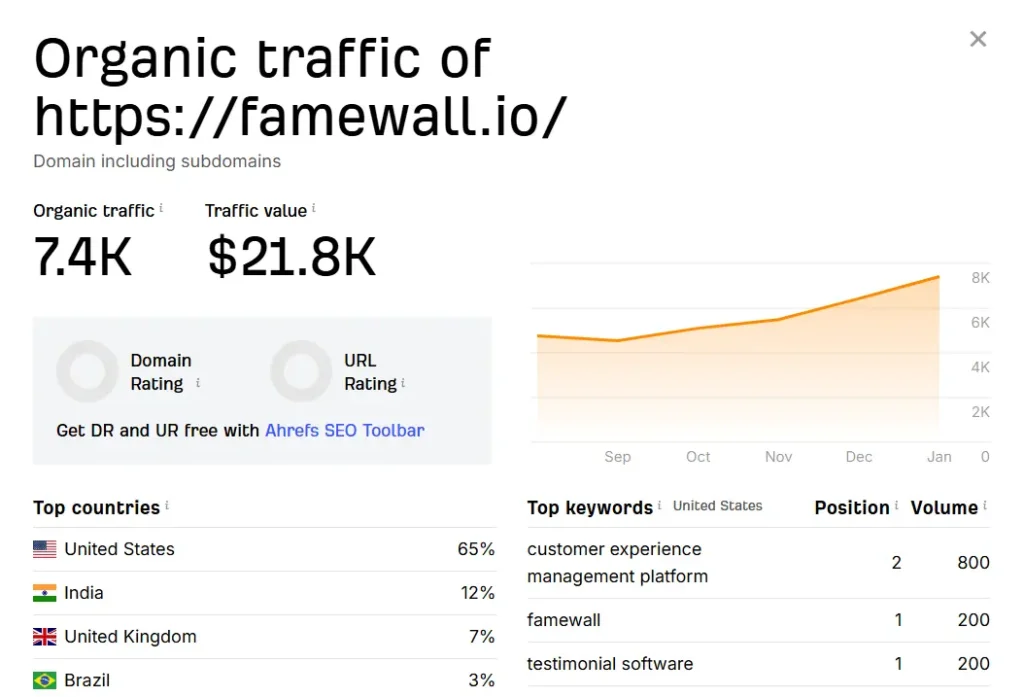
Here i have given an image in which you can see how much a small website of invoice maker tool is eaning per month if you want to see this website then go to this link- invoice maker tool
Final Thoughts: Is an Invoice Maker Tool Profitable?
Yes very profitable, if done right.
An invoice maker tool:
- Solves a real problem
- Has evergreen demand
- Works globally
- Offers multiple income streams
Once built and marketed properly, it can become a passive income machine.
Conclusion: Turning an Invoice Maker Tool Into a Real Income Asset
In today’s digital first business world, an Invoice Maker Tool is much more than just a utility for creating bills it is a practical solution to a daily business problem and a strong opportunity to build a sustainable income stream.
What makes an invoice maker tool so powerful is its universal demand. Freelancers, startups, agencies, shop owners, and even large businesses all need invoices. This means your tool is not limited to one industry or one country. As long as people are earning money, they will need a simple and reliable way to bill their clients.
From a monetization point of view, the beauty of an invoice maker tool lies in its flexibility. You are not dependent on just one earning method. You can start small with a free tool and ads, grow into a freemium model, and later scale into a subscription based SaaS. You can sell premium features, templates, white label solutions, or even the source code itself. Each model adds a new layer of income without rebuilding everything from scratch.
Most importantly, an invoice maker tool builds trust. When users rely on your tool for something as sensitive as payments and billing, they naturally see value in it. And when people see value, they are willing to pay not because they are forced to, but because your tool genuinely makes their work easier, faster, and more professional.
In short, if you’re looking for a tool that is easy to understand, useful for real people, and capable of generating long-term income, an Invoice Maker Tool is one of the smartest choices you can make.
