

Introduction: Why Ads Revenue Estimation Matters Today
In today’s digital world, online income is no longer a mystery it’s a system. Thousands of bloggers, website owners, YouTubers, and app developers earn money daily through advertisements. But one big question always comes first:
“How much can I actually earn from ads?”
This is where an Ads Revenue Checker Tool becomes extremely important.
An Ads Revenue Checker Tool helps users estimate potential ad earnings based on traffic, page views, CPM, and other factors. Whether you are a beginner planning to start a blog or a professional analyzing competitors, this tool gives you clarity, confidence, and direction.
What Is an Ads Revenue Checker Tool?
An Ads Revenue Checker Tool is an online calculator that estimates how much money a website, blog, or app can earn from ads.
It does not show exact earnings, but it provides a realistic estimate based on publicly known advertising metrics.
Simple Definition
An Ads Revenue Checker Tool estimates ad income using traffic data and ad rates.
This tool is especially useful for:
- Bloggers
- SEO learners
- Digital marketers
- Affiliate marketers
- Website buyers and sellers
How Does an Ads Revenue Checker Tool Work?
The working of an Ads Revenue Checker Tool is simple but powerful.
Step-by-Step Working Process
1. User Enters Traffic Data
The user provides:
- Daily / Monthly visitors
- Page views
2. Tool Uses Ad Metrics
The tool considers:
- CPM (Cost Per 1000 Impressions)
- CTR (Click Through Rate) (optional)
- CPC (Cost Per Click) (optional)
3. Calculation Formula (Basic)
Estimated Revenue = (Page Views ÷ 1000) × CPM
4. Revenue Display
The tool shows:
- Daily ad revenue
- Monthly ad revenue
- Yearly ad revenue
All results are estimated, not guaranteed.
Important Terms You Must Understand
Before going deeper, let’s clarify key ad terms:
- CPM – Money earned per 1000 ad views
- CPC – Money earned per ad click
- CTR – Percentage of users clicking ads
- Impressions – Number of times ads are shown
Understanding these terms helps users trust your tool.
Key Features of a High-Quality Ads Revenue Checker Tool
A successful Ads Revenue Checker Tool must be simple, fast, and informative.
1. Easy-to-Use Interface
- Clean layout
- Minimal inputs
- Beginner-friendly design
2. Multiple Revenue Estimates
- Daily income
- Monthly income
- Yearly income
3. Custom CPM Input
Allow users to:
- Enter their own CPM
- Adjust earning expectations
4. Mobile & Desktop Responsive
Most users come from mobile devices.
5. Fast Loading Speed
Speed improves:
- User experience
- SEO ranking
6. Clear Disclaimer
Transparency builds trust.
How to Build an Ads Revenue Checker Tool
Building an Ads Revenue Checker Tool may sound technical, but in reality it’s much simpler than most beginners think. This tool is basically a smart calculator that helps users estimate how much money they can earn from ads based on traffic and ad rates.
In this guide, I’ll explain everything in a human, beginner-friendly way, as if you’re building this tool for your own website from scratch.
Step 1: First Understand the Purpose of the Tool
Before writing any code, ask yourself one clear question:
What problem is my tool solving?
The answer is simple:
Your Ads Revenue Checker Tool helps users estimate ad income so they can:
- Set realistic earning goals
- Decide whether blogging or websites are worth it
- Understand how traffic converts into money
When your purpose is clear, building the tool becomes much easier.
Step 2: Decide What Your Tool Will Calculate
A good beginner tool should not be complicated.
Minimum things your tool should calculate:
- Daily Ads Revenue
- Monthly Ads Revenue
- Yearly Ads Revenue
Basic inputs you need from users:
- Monthly Page Views
- CPM (Cost Per 1000 Impressions)
You don’t need CTR or CPC at the beginning. Simple tools perform better and rank faster in SEO.
Step 3: Understand the Core Formula (Heart of the Tool)
Every Ads Revenue Checker Tool works on a simple logic.
Most beginner-friendly formula:
Estimated Monthly Revenue = (Monthly Page Views ÷ 1000) × CPM
Example:
- Monthly page views: 50,000
- CPM: $5
(50,000 ÷ 1000) × 5 = $250 per month
This single formula is the foundation of your entire tool.
Step 4: Plan the User Interface (UI) Like a Real User
Think like a visitor, not a developer.
A good UI should have:
- 2 input boxes
- 1 calculate button
- 1 clean result area
Ideal input fields:
- “Enter Monthly Page Views”
- “Enter Average CPM ($)”
Button text:
- “Check Ads Revenue”
- “Calculate Earnings”
The goal is zero confusion. A user should understand your tool without reading instructions.
This is where your tool becomes visible.
HTML will:
- Create the structure
- Add input boxes
- Add a button
- Add a result section
CSS will:
- Make the tool look professional
- Improve readability
- Make it mobile-friendly
Tip:
Simple design builds more trust than fancy design.
Step 6: Add the Brain (JavaScript Logic)
JavaScript is what makes your tool actually work.
What JavaScript does:
- Reads user input (page views & CPM)
- Applies the revenue formula
- Calculates:
- Monthly revenue
- Daily revenue
- Yearly revenue
- Shows results instantly (no page reload)
Human-friendly result example:
“Based on your traffic, you can earn approximately $8.33 per day, $250 per month, and $3,000 per year from ads.”
This kind of message feels personal and motivating.
Step 7: Add a Clear Disclaimer (Very Important)
Never promise exact earnings.
At the bottom of your tool, add a simple disclaimer:
“This tool provides estimated ad revenue. Actual earnings may vary depending on niche, traffic quality, ad placement, and ad network.”
This:
- Builds trust
- Protects you legally
- Makes your tool look professional
Step 8: Make the Tool SEO Friendly
Your tool should not just work it should rank on Google.
SEO basics you must follow:
- Keyword in URL (example:
/ads-revenue-checker-tool) - One clear H1 heading
- Supporting content around the tool
- Fast loading speed
- Mobile optimization
Pro tip:
Google loves tools that actually help users. Simplicity + usefulness = rankings.
Step 9: Test the Tool Like a Normal User
Before publishing, test:
- Empty inputs
- Very high numbers
- Mobile view
- Different browsers
Ask yourself:
“If I was a beginner, would I trust this tool?”
If yes, you’re ready to publish.
Step 10: Improve the Tool Over Time (Growth Phase)
Once your basic tool is live, you can slowly upgrade it.
Future improvements:
- Country-based CPM suggestion
- Niche-based earning estimate
- Advanced mode (CTR + CPC)
- Downloadable revenue report
- AI-based smart suggestions
Start small, grow smart.
Why This Tool Is Perfect for Beginners
- No backend needed
- No database required
- Works fully on frontend
- Easy to maintain
- Great for SEO traffic
- High monetization potential
This is why Ads Revenue Checker Tool is one of the best tools for learning + earning.
If you want to learn how to build Ads revenue checker tool,Then according to me, Skillgenerator is the best platform for learn this And if you want to learn this by watching the video then click on the link given below. Learn how to make- ads revenue checker tool
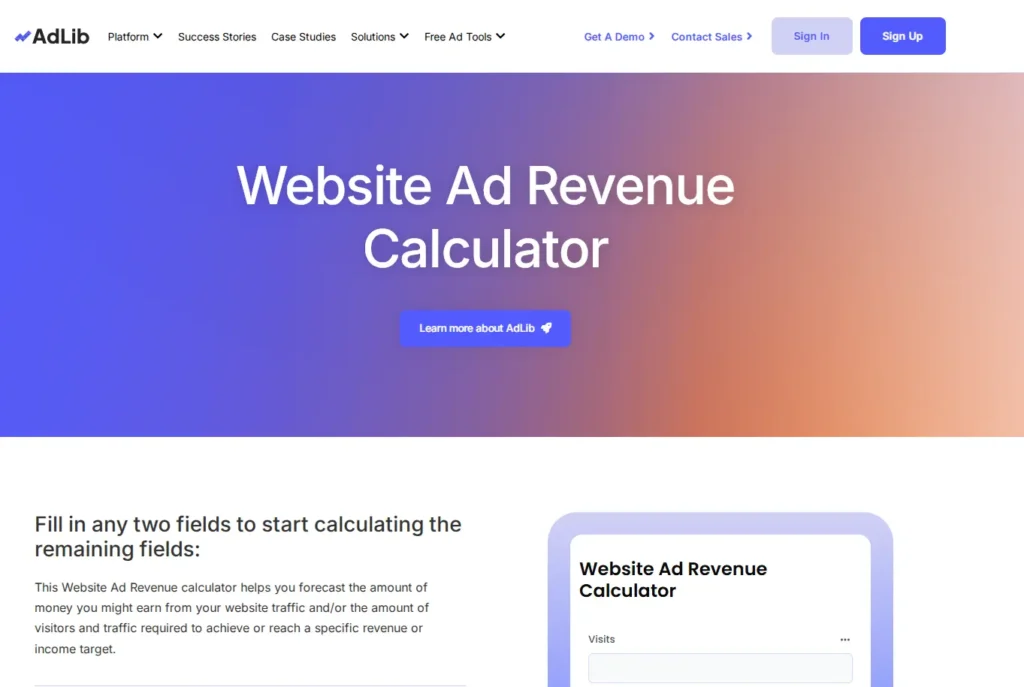
Here is an image given below which you can see and understand how your tool site will be made and you can also visit to this website and see how it works by clicking on this link- Ads revenue checker Tool
Benefits of Using an Ads Revenue Checker Tool
1. Clear Income Expectations
Users know:
- What traffic is needed
- What income is possible
2. Boosts Motivation
Seeing numbers turns dreams into goals.
3. Better Niche Selection
Users can compare:
- High traffic + low CPM niches
- Low traffic + high CPM niches
4. Saves Time & Effort
No guesswork, only planning.
5. Useful for Competitor Analysis
Helps users understand market potential.
How to Monetize an Ads Revenue Checker Tool (Present Income)
Once your Ads Revenue Checker Tool starts getting traffic, monetization doesn’t feel forced—it feels natural. The reason is simple: people visiting your tool are already interested in earning money online. You’re not selling to random users; you’re helping people who already have intent.
Below are the most effective, beginner-friendly ways to monetize your Ads Revenue Checker Tool right now, explained in a human and practical way.
1. Display Ads (Easiest & Automatic Income)
This is the first and safest monetization method. Once traffic comes in, earnings start automatically.
How it works in real life
- A user visits your Ads Revenue Checker Tool
- They calculate their potential earnings
- Ads are displayed naturally around the tool
- You earn money when ads are viewed or clicked
You don’t need to convince anyone. Ads work silently in the background.
Best ad networks to start with
- Google AdSense – beginner-friendly, trusted, auto-optimized
- Media.net – great alternative, especially for English traffic
- Other display ad networks as your traffic grows
Where to place ads for best results
- Above the calculator (without disturbing UX)
- Below the results section
- Sidebar (desktop only)
Human tip:
Never overload ads. A clean tool builds trust, and trust always earns more in the long run.
2. Affiliate Marketing (High-Profit Monetization)
Affiliate marketing is where your real money potential begins.
Your audience is asking:
“How can I actually earn this money?”
This makes them perfect buyers.
What you should promote
Promote only what naturally fits the user’s journey:
1. Hosting Services
- For users who want to start a blog or website
- Example context: “To earn ads revenue, you’ll need a fast and reliable website.”
2. Blogging Tools
- Keyword research tools
- SEO tools
- Content optimization tools
3. SEO & Blogging Courses
- Beginners are always looking for guidance
- Courses convert extremely well when placed after results
How to promote without sounding salesy
- Add a small section below the result: “Want to increase this revenue? These tools can help.”
- Use buttons instead of banners
- Explain why the tool/course helps
This feels like help, not selling.
3. Lead Generation (Build an Asset, Not Just Income)
Lead generation is about long-term earning, not instant money.
What you collect
- Email addresses
- Newsletter subscribers
How to collect leads naturally
After showing revenue results, say:
“Want a step-by-step plan to reach this income? Get it free in your email.”
Offer something valuable:
- Free guide
- Income roadmap
- SEO checklist
- Blogging starter plan
How you earn from leads later
Once you have emails, you can sell:
- Online courses
- Paid guides
- Consulting services
- Affiliate products
Human truth:
Traffic disappears. Email lists stay with you forever.
4. Premium Version (Smart & Scalable Income)
Once users trust your free tool, many are happy to pay for advanced features.
What to offer in the premium version
- Advanced revenue calculations
- Country-wise CPM estimation
- Niche-based income predictions
- Monthly downloadable reports (PDF)
- Ad optimization tips
Pricing strategy (beginner-friendly)
- Low monthly price
- Simple plans
- Clear value
Example:
“Upgrade to Pro and get accurate, country-based ad revenue insights.”
This turns your tool into a mini SaaS product.
How These Methods Work Together (Smart Monetization Stack)
The smartest creators don’t use just one method.
Example monetization flow:
- Free user → uses the tool
- Sees ads → you earn small passive income
- Clicks affiliate recommendation → higher commission
- Joins email list → long-term relationship
- Upgrades to premium → recurring income
This is how small tools become big businesses.
Why Ads Revenue Checker Tools Monetize So Well
- Audience already wants to earn
- High trust tool
- Evergreen topic
- Global demand
- Low maintenance
You build once and earn repeatedly.
Final Human Thought
Monetization is not about forcing money out of users.
It’s about helping them move one step closer to their goal.
If your Ads Revenue Checker Tool:
- Solves a real problem
- Is honest and easy to use
- Recommends helpful resources
Then monetization becomes a natural by-product of trust.
Future Earning Potential of Ads Revenue Checker Tool
The future of this tool is very strong.
1. AI-Powered Estimates
Future tools will:
- Auto-suggest CPM
- Analyze niche profitability
- Predict earnings growth
2. SaaS Model
Monthly subscription for:
- Agencies
- Marketers
- Bloggers
3. Integration With SEO Tools
Combine with:
- Traffic checker
- Keyword tools
- Website audit tools
4. Global Market Expansion
Ads revenue exists everywhere—language is no barrier.
Common Mistakes to Avoid
- Promising exact earnings
- Complicated UI
- No disclaimer
- Ignoring mobile users
- Poor SEO optimization
SEO Tips for Ranking Your Ads Revenue Checker Tool
- Use keyword in title & URL
- Write detailed supporting content
- Add FAQ schema
- Improve page speed
- Get backlinks
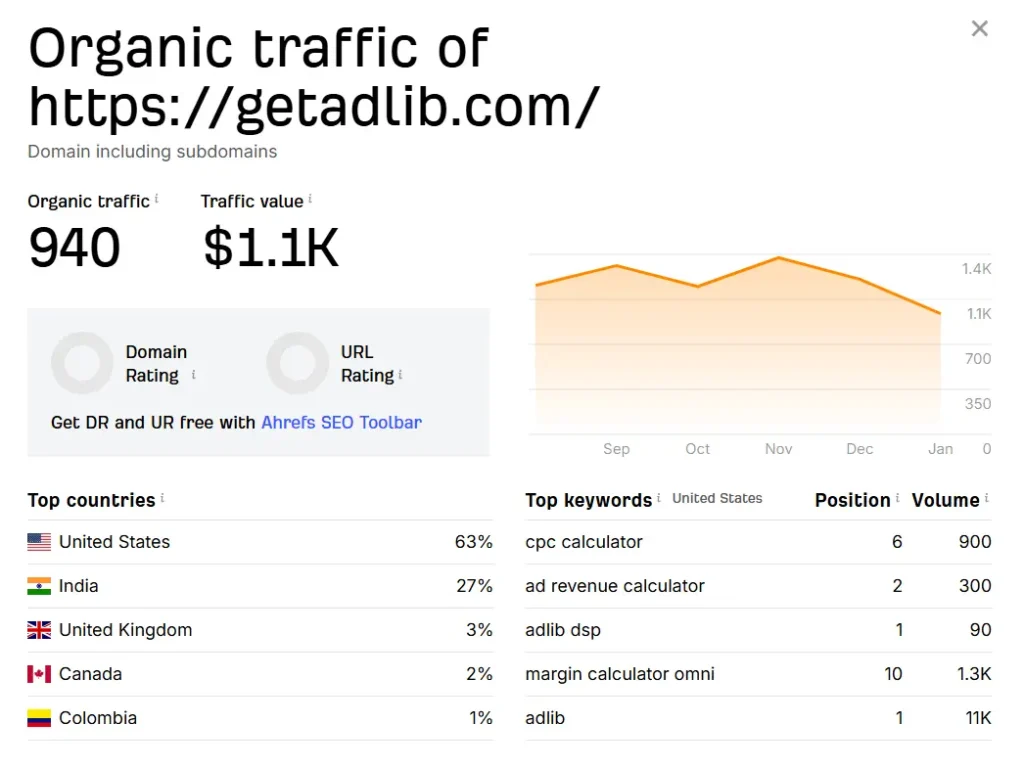
Here i have given an image in which you can see how much a small website of invoice maker tool is eaning per month if you want to see this website then go to this link- Ads revenue checker tool
Conclusion: Turning an Ads Revenue Checker Tool into a Long-Term Digital Asset
An Ads Revenue Checker Tool is much more than a simple calculator it is a decision-making guide for anyone who wants to understand, plan, and grow their online advertising income. By clearly showing users how traffic converts into potential earnings, the tool removes confusion and replaces it with clarity, confidence, and motivation.
When built with simplicity, transparency, and user intent in mind, this tool naturally earns trust. That trust opens multiple monetization opportunities from display ads and affiliate marketing to lead generation and premium features. Instead of pushing sales, the tool educates first, allowing income to grow as a natural outcome of value.
Most importantly, an Ads Revenue Checker Tool has strong long-term potential. As digital advertising continues to expand, people will always search for ways to estimate, improve, and scale their earnings. With the right SEO foundation, clean design, and honest calculations, this tool can evolve into a powerful digital product, a traffic magnet, and a sustainable source of passive income.
In the end, success with an Ads Revenue Checker Tool does not depend on complex technology it depends on understanding users, solving a real problem, and delivering value consistently. Build it with purpose today, and it can continue generating results, trust, and revenue well into the future.
