
Introduction
In today’s digital world, images play a crucial role in communication, branding, marketing, and content creation. Whether you are a blogger, YouTuber, eCommerce seller, social media creator, or business owner, image quality directly affects engagement and trust.
However, not everyone has access to high end cameras or professional photo editing skills. This is where the AI Image Enhancer Tool comes into play.
An AI Image Enhancer is a revolutionary solution that uses Artificial Intelligence and Machine Learning to automatically improve image quality making blurry, low resolution, or dull images look sharp, clean, and professional with just one click.
What Is an AI Image Enhancer Tool?
An AI Image Enhancer Tool is a software or web based application that uses deep learning algorithms to enhance image quality automatically.
Unlike traditional photo editing tools that require manual adjustments (brightness, contrast, sharpness, etc.), AI image enhancers analyze the image intelligently and apply improvements on their own.
In Simple Words:
An AI Image Enhancer Tool improves image resolution, sharpness, colors, and details using artificial intelligence without manual editing.
How Does an AI Image Enhancer Tool Work?
Behind the scenes, AI Image Enhancer tools rely on neural networks trained on millions of high-quality images.
Step-by-Step Working Process:
- Image Upload
The user uploads a low-quality, blurred, or old image. - AI Analysis
AI analyzes:- Pixel structure
- Noise levels
- Missing details
- Facial features (if present)
- Model Processing
The AI model:- Predicts missing pixels
- Enhances edges
- Reduces noise
- Improves color accuracy
- Image Reconstruction
A high-resolution, sharpened, and visually appealing image is generated. - Final Output
The user downloads the enhanced image in HD or 4K quality.
All of this happens within seconds.
Key Features of an AI Image Enhancer Tool
A powerful AI Image Enhancer typically includes the following features:
1. Image Upscaling
- Converts low-resolution images into HD, 2K, or 4K
- Ideal for printing and professional use
2. Blur & Noise Removal
- Removes grainy texture
- Fixes motion blur and camera shake
3. Face Enhancement
- Sharpens facial features
- Improves skin texture
- Enhances eyes and expressions
4. Color Correction
- Automatically adjusts brightness and contrast
- Restores natural colors
5. Old Photo Restoration
- Fixes faded photos
- Repairs scratches and damage
6. One-Click Enhancement
- No technical skills required
- Beginner-friendly interface
How to Build an AI Image Enhancer Tool (With Coding)
If you have programming knowledge, you can build your own AI Image Enhancer from scratch or by integrating existing models.
Skills Required:
- Python
- Basic Machine Learning knowledge
- Image processing concepts
Technologies Used:
- Python
- OpenCV
- Deep Learning frameworks
- Pre-trained Super-Resolution models
Development Workflow:
- Set up Python environment
- Load pre-trained AI models
- Accept image input
- Process image using AI
- Output enhanced image
- Build a simple web interface
Advantages of Coding Method:
- Full control over features
- Lower long-term cost
- Custom branding
- Scalable SaaS potential
How to Build an AI Image Enhancer Tool (Without Coding)
If you don’t know coding, you can still build a professional AI Image Enhancer using no-code platforms and AI APIs.
No-Code Tools You Can Use:
- Website builders
- No-code app platforms
- Automation tools
How It Works:
- Create a simple website or app UI
- Add image upload functionality
- Connect AI image enhancement API
- Display enhanced image output
- Add download button
Advantages of No-Code Method:
- Zero programming required
- Faster launch
- Beginner-friendly
- Perfect for bloggers & marketers
If you want to learn how to build Ads revenue checker tool,Then according to me, Skillgenerator is the best platform for learn this And if you want to learn this by watching the video then click on the link given below. Learn how to make-AI Image Enhancer Tool
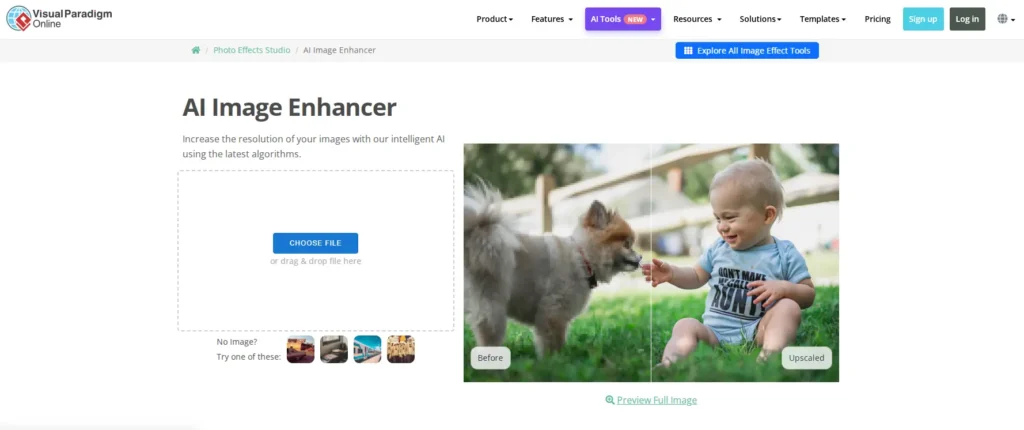
canwa also has its own image enhancer tool site and Here is an image given below which you can see and understand how your tool site will be made and you can also visit to this website and see how it works by clicking on this link- AI Image Enhancer Tool
Benefits of Using an AI Image Enhancer Tool
For Individuals:
- Saves time
- No design skills needed
- Professional-quality images
For Businesses:
- Better brand image
- Higher conversion rates
- Improved customer trust
For Content Creators:
- Eye-catching thumbnails
- Higher engagement
- Improved reach
Top 10 Ways to Earn Money from an AI Image Enhancer Tool
Building an AI Image Enhancer Tool is not just a technical project it can also become a profitable online business with multiple income streams. Because image quality is essential for bloggers, YouTubers, eCommerce sellers, designers, and social media creators, millions of users actively look for tools that can enhance their photos quickly.
Here are all the proven ways to earn money from an AI Image Enhancer Tool:
1. Paid Subscription Plans (Most Profitable Model)
This is the most common method used by top AI tools like Remini, PicsArt, and Fotor.
You can offer:
Free Plan
- Limited image enhancements (e.g., 3 images/day)
- Basic features only
- Low resolution output
Paid Plans
- Unlimited enhancements
- HD / 4K output
- Batch processing
- Face enhancement
- Priority speed
Why this works:
Users who regularly enhance images for work (YouTubers, sellers, freelancers) are happy to pay monthly.
How you earn:
- Monthly subscription (e.g., $5, $10, or $19 per month)
- Yearly plan with discount
2. Pay-Per-Image Credits (Best for New Tools)
Instead of monthly billing, users can buy credits only when needed.
Example:
- 10 credits → $3
- 50 credits → $10
- 200 credits → $29
Perfect for:
- Occasional users
- Students
- People who need quick fixes
Why it earns well:
No commitment + micro-transactions = higher conversion.
3. Google AdSense / Display Ads (If You Offer Free Tool)
If you provide a free version of your AI Image Enhancer and get good traffic, you can earn using ads.
Where to place ads:
- Homepage
- Enhancement result page
- Blog pages
- Download page
Average Income:
- $2–$15 per 1,000 visitors (depends on traffic country)
If the tool goes viral, a free tool with ads alone can make $500–$5,000+ per month.
4. Affiliate Marketing (Zero Cost & Passive Income)
You can promote related products inside your tool or blog:
Promote:
- Graphic design tools
- Stock photo websites
- AI writing tools
- Hosting platforms
- Online courses
Where to add:
- Blog posts
- Sidebar ads
- Footer links
- Pop-up recommendations
- “Tools We Recommend” section
Every time someone purchases a product through your affiliate link, you earn a commission.
5. Premium Filters & Advanced Enhancements (In-App Purchases)
This works perfectly if you want to monetize specific features.
Examples:
- Face ultra-HD enhancement
- Old photo restoration
- Magic color fix
- AI background boost
- Anime / cartoon filter
- 8K upscale filter
Users pay extra for special upgrades.
6. Offer a White-Label Version (B2B Income)
You can sell your AI Image Enhancer Tool to:
- Agencies
- Startups
- Photo studios
- E-commerce companies
- Designers
They pay you for:
- Custom branding
- Their logo and name
- Private server setup
This can bring $300 – $5,000 per client, depending on customization.
7. Sell API Access (For Developers & Businesses)
If you create your own model or use open-source enhancement models, you can offer an API service.
How this works:
Developers pay to use your image enhancement API inside their apps or websites.
You charge based on:
- Per API call
- Per 1000 images
- Monthly usage plan
This is a powerful way to scale your revenue.
8. Lifetime Deal Launch (Fast Early Income)
Offer a one-time payment plan like:
- $29 lifetime access
- $59 lifetime Pro
- $99 lifetime Agency plan
This helps you:
- Get fast users
- Generate early revenue
- Fund future development
Platforms like AppSumo, Dealify, and Product Hunt can boost your sales.
9. Sell Templates, Presets, and Add-Ons
Along with the enhancer tool, you can create:
- Preset color filters
- Thumbnail enhancement presets
- Photo repair templates
- Social media templates
Sell them at:
- $9
- $19
- $29
These are high-profit digital products.
10. Sponsored Promotions and Brand Partnerships
Once your tool becomes popular, brands may pay you to promote:
- Photo editing apps
- Camera accessories
- AI tools
- Editing courses
You can earn:
- $100–$2,000 per sponsored promotion
(depending on traffic & audience size)
Example Monthly Earning Potential
| Traffic / Users | Potential Monthly Income |
|---|---|
| 10,000 users | $200 – $800 |
| 50,000 users | $1,000 – $5,000 |
| 100,000 users | $5,000 – $20,000 |
| 500,000+ users | $30,000+ |
With global audience (especially US, UK, Canada), your revenue can become life changing.
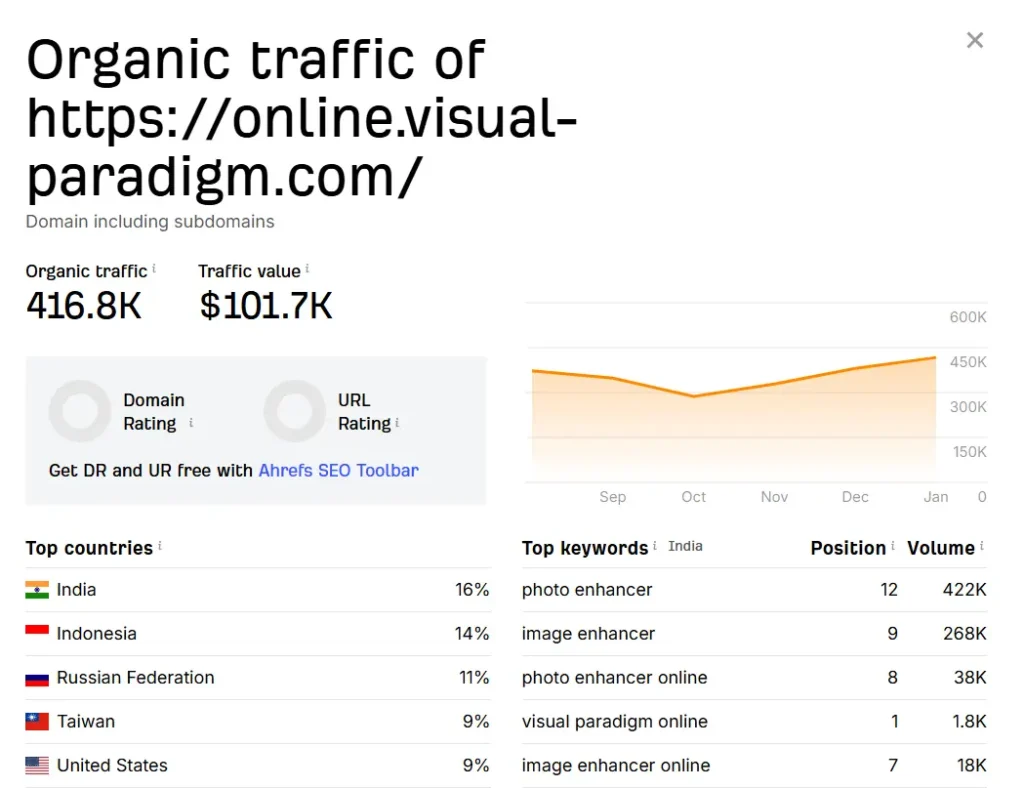
Here i have given an image in which you can see how much a small website of invoice maker tool is eaning per month if you want to see this website then go to this link- AI Image Enhancer Tool
Future of AI Image Enhancer Tools (2026 & Beyond)
The future of AI Image Enhancer tools looks extremely promising.
Upcoming Trends:
- Real-time enhancement
- Video image enhancement
- Mobile AI integration
- Personalized AI models
- Integration with social platforms
As AI adoption grows, image enhancement will become a basic digital necessity, increasing demand for these tools.
FAQs
Q1. Is AI Image Enhancer free?
Yes, many tools offer free versions with limited features.
Q2. Do I need editing skills?
No, AI handles everything automatically.
Q3. Can I use it for commercial work?
Yes, depending on the tool’s license.
Q4. Is it safe to upload images?
Most tools use encrypted processing, but always check privacy policies.
Q5. Can beginners create an AI Image Enhancer tool?
Yes, using no-code platforms and APIs.
Conclusion
AI Image Enhancer Tools have truly changed the way we work with images in the digital world. What once required expensive software, professional editing skills, and hours of manual effort can now be done in just a few seconds with the power of artificial intelligence. From restoring old and damaged photographs to creating sharp, eye catching visuals for websites, social media, and businesses, these tools deliver speed, simplicity, and impressive results that anyone can use.
For everyday users, an AI Image Enhancer makes image improvement effortless no technical knowledge, no complex settings, and no learning curve. At the same time, for creators, marketers, and entrepreneurs, it opens the door to a fast growing opportunity. Building or using an AI Image Enhancer Tool is no longer limited to developers; thanks to no-code platforms and ready to use AI APIs, anyone can turn this idea into a real product or online business.
With low startup costs, flexible development options (both coding and no-code), and an increasing demand for high quality visuals across all digital platforms, AI Image Enhancer Tools are set to become an essential part of the online ecosystem. Looking ahead to 2026 and beyond, investing time or resources in this space is not just a smart move it’s a future ready decision that can create long term value, impact, and income.
