

In today’s competitive digital world, having a website is not enough. Your website must be fast, clean, SEO friendly, and technically correct. Many website owners focus only on content and backlinks, but they ignore one critical factor code quality. This is exactly where the W3C Validator Tool becomes extremely important.
What Is the W3C Validator Tool?
The W3C Validator Tool is an online tool that checks whether your website’s HTML, CSS, and markup code follows official web standards.
It is developed and maintained by the World Wide Web Consortium (W3C), the global authority that sets rules and standards for how websites should be built and displayed on the internet.
In simple words:
The W3C Validator Tool works like a grammar checker for your website’s code.
Just like Grammarly finds mistakes in writing, the W3C Validator finds mistakes in your website’s HTML and CSS.
Why Web Standards Matter for SEO and Speed
Web standards are rules that ensure websites work properly across:
- Different browsers (Chrome, Firefox, Safari)
- Different devices (mobile, tablet, desktop)
- Different screen sizes and operating systems
When your code does not follow standards, it can cause:
- Slow loading speed
- Layout breaking on some browsers
- SEO crawling issues
- Poor user experience
- Accessibility problems
The W3C Validator Tool helps you identify and fix these problems at the code level.
How the W3C Validator Tool Works
Understanding how the W3c Validator tool works will help you use it more effectively.
Step 1: Input Your Website or Code
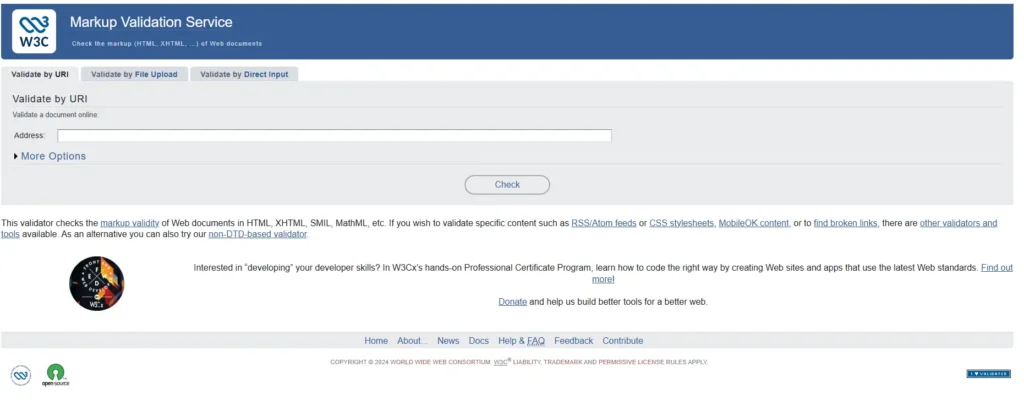
The tool allows three validation methods:
- Enter a live website URL
- Upload an HTML file
- Paste HTML/CSS code directly
Step 2: Code Analysis
Once submitted, the validator:
- Reads your HTML and CSS
- Parses the structure
- Compares it with official W3C specifications
Step 3: Error & Warning Detection
The tool then identifies:
- Syntax errors
- Invalid tags
- Missing attributes
- Improper nesting
- Deprecated elements
Step 4: Detailed Report
You receive a report that includes:
- Error descriptions
- Line numbers
- Code references
- Warnings and suggestions
This process ensures your website is technically clean and standards compliant.
Key Features of the W3C Validator Tool
1. HTML Validation
Checks your HTML structure and syntax, including:
- Missing closing tags
- Invalid elements
- Wrong nesting
- Duplicate IDs
2. CSS Validation
Analyzes your CSS for:
- Invalid properties
- Syntax errors
- Unsupported rules
- Deprecated CSS styles
3. Line-by-Line Error Reporting
Each error comes with:
- Exact line number
- Explanation of the issue
- Suggestions to fix it
This makes debugging much easier, even for beginners.
4. Browser Compatibility Support
By following W3C standards, your website becomes compatible with:
- Chrome
- Firefox
- Safari
- Edge
- Mobile browsers
5. Free and Reliable
The W3C Validator Tool is:
- 100% free
- Trusted globally
- Used by professionals, developers, and SEO experts
6. Support for Modern Web Technologies
The tool supports:
- HTML5
- CSS3
- Modern markup standards
How W3C Validation Improves SEO
Although Google does not directly rank websites based on W3C validator tool, clean code indirectly improves SEO in multiple ways.
1. Better Crawling and Indexing
Search engines read your website code to understand content. Clean code:
- Reduces crawling errors
- Helps search bots read content easily
- Improves indexing efficiency
2. Improved Website Speed
Invalid or messy code can:
- Increase DOM size
- Slow rendering
- Cause unnecessary reflows
Valid code results in:
- Faster page load times
- Better Core Web Vitals
- Improved user retention
3. Lower Bounce Rate
A fast and stable website keeps users engaged. This sends positive signals to search engines.
4. Mobile SEO Improvement
Validated code ensures:
- Responsive layouts work correctly
- No mobile rendering issues
- Better mobile user experience
How to Create Your Own W3C Validator Tool
Creating your own W3C-like Validator Tool may sound technical at first, but once you understand the process step by step, it becomes much simpler. Depending on your skills and goals, you can build a basic, intermediate, or even an advanced validator.
Below is a clear and practical roadmap to help you get started.
✅ Step 1: Understand What a Validator Really Does
At its core, a validator tool checks whether a website’s HTML and CSS code is written correctly and follows web standards.
A W3C-style validator checks things like:
- Are HTML tags opened and closed properly?
- Are attributes valid and correctly written?
- Does the CSS follow correct syntax?
- Is the overall structure of the markup clean and logical?
So, your tool should be able to:
- Take HTML input or a website URL
- Scan and analyze the code
- Detect mistakes
- Show clear error messages with line numbers
- Suggest possible fixes
This basic idea is the foundation of every validator tool.
✅ Step 2: Decide the Level of Validator You Want to Build
Before coding, decide how advanced your tool should be.
🔹 Basic HTML Validator (Easy)
This version checks common mistakes like:
- Missing closing tags
- Incorrect nesting
- Unclosed quotes
- Invalid characters
It’s perfect for beginners and can be built using HTML, CSS, and JavaScript only.
🔹 Intermediate Validator (Medium Difficulty)
This level adds smarter checks such as:
- HTML tag hierarchy rules
- Required attributes
- Disallowed or outdated elements
- Common HTML5 validation rules
For this, you’ll need Node.js, parsing libraries, and backend logic.
🔹 Advanced W3C-Level Validator (Hard)
This version validates:
- Full HTML5 specifications
- DOM structure rules
- CSS parsing
- Accessibility guidelines
It requires strong programming knowledge, deep understanding of HTML specs, and a powerful backend engine. You don’t need to build this immediately but it’s good to know the long-term goal.
✅ Step 3: Choose the Right Technology Stack
Frontend (User Interface)
To build the user interface, use:
- HTML
- CSS
- JavaScript
Your UI should include:
- A code editor or textarea
- A Validate button
- A results section to display errors
Backend (Processing Engine)
For backend logic, you can choose:
- Node.js (most popular choice)
- Python (Flask or Django)
- PHP (easy hosting support)
Parsing Libraries (Very Important)
To understand and analyze code, use parsing libraries.
For HTML:
- htmlparser2
- parse5
- jsdom
For CSS:
- csstree
- stylelint
These tools help your validator “read” and understand the structure of HTML and CSS.
✅ Step 4: Build a Clean Frontend Interface
Your validator’s interface should feel simple and professional. It should allow users to:
- Paste HTML code directly
- Enter a website URL
- Upload an
.htmlfile
After clicking the Validate button, results should appear clearly, showing:
- Error lines
- Error messages
- Suggestions
- Color-coded warnings
A clean UI builds trust and improves user experience.
✅ Step 5: Create the Validation Engine (Backend)
This is the brain of your tool.
First, receive input from the user either raw HTML or a fetched webpage.
Next, parse the HTML using a library like parse5 to break it into tags, attributes, and structure.
Then apply validation rules, such as:
- Incorrect nesting
- Unclosed tags
- Missing required attributes
- Invalid or misspelled attributes
- Deprecated HTML tags
- CSS syntax errors (optional)
Finally, collect all detected issues and return them in a structured format with messages, line numbers, and suggestions.
✅ Step 6: Display Results Clearly
Show validation results in a readable way, for example:
- Red for errors
- Yellow for warnings
- Green for valid code
Clear visual feedback makes your tool easy to use, even for non-developers.
✅ Step 7: Add Extra Features (Optional)
To make your tool more powerful, you can add:
- Dark and light mode
- Live validation while typing
- HTML and CSS beautifier
- Accessibility checker
- SEO suggestions
- Downloadable validation reports
These features help your tool stand out from others.
✅ Step 8: Host Your Tool Online
Once ready, deploy your tool using platforms like:
- Vercel (best for Node.js)
- Netlify (fast and free)
- Render
- Hostinger VPS for professional use
Now your validator becomes a public tool that anyone can use.
✅ Step 9: Branding and SEO
To turn your validator into a real product, add:
- A tool name and logo
- A clear tagline
- SEO-friendly meta title and description
- A clean homepage
- A blog section to drive traffic
This helps your tool gain users and rank on Google.
✨ Final Thought
Building your own W3C-style validator is not just a coding project it’s a powerful learning experience. Start small, improve step by step, and over time you can create a professional-level website validation tool.
If you want, I can also:
- Simplify this further for beginners
- Convert it into a full blog section
- Provide sample code
If you want to learn how to build W3c validator tool ,Then according to me, Skillgenerator is the best platform for learn this And if you want to learn this by watching the video then click on the link given below. Learn how to make-w3c validator tool
Here is an image given below which you can see and understand how your tool site will be made and you can also visit to this website and see how it works by clicking on this link- W3c validator tool
Benefits of Using the W3C Validator Tool
✔ Clean and Professional Code
Your website follows global web standards, making it future-proof.
✔ Faster Website Performance
Optimized and error-free code loads faster across all devices.
✔ Improved User Experience
Visitors enjoy a smooth, consistent layout without bugs or glitches.
✔ Higher SEO Potential
Clean code supports better rankings by improving crawlability and speed.
✔ Cross-Browser Compatibility
Your website looks and works the same everywhere.
✔ Easier Maintenance
Clean code is easier to update, scale, and maintain.
common Errors Found by the W3C Validator Tool
Some frequent mistakes include:
- Missing
altattributes on images - Improperly nested elements
- Deprecated tags like
<font>or<center> - Duplicate IDs
- Invalid CSS properties
Fixing these small issues can make a big difference in overall website quality.
Who Should Use the W3C Validator Tool?
This tool is useful for:
- Website owners
- Bloggers
- SEO professionals
- Web developers
- WordPress users
- Freelancers
- Agencies
Even if you don’t know coding, you can still use the validator to identify problems and share them with a developer.
⭐ How to Earn Money from a W3C Validator Tool
Building a W3C Validator Tool is great but earning money from it is even better.
If you create a clean, fast, and helpful W3c validator Tool, you can easily convert it into a long term income source.
Below are all the authentic and profitable ways to monetize your validator tool, even if you are a complete beginner.
✅ 1. Display Google AdSense Ads on Your Tool
This is the easiest and most common way to earn money.
When users visit your tool to validate their code, you can show:
- Banner ads
- In-article ads
- Sticky ads
- Auto ads
If your tool gets good traffic, you can earn money every month through:
- CPC (Cost Per Click)
- CPM (Cost Per 1,000 impressions)
A simple validator tool can easily get thousands of monthly visitors, especially from:
- Developers
- Bloggers
- Web designers
- Students
- WordPress users
Income Potential:
💰 $200 – $2,000 per month (depending on traffic)
✅ 2. Promote Hosting Affiliate Programs (High Income)
Your tool will attract website owners and developers.
These users also need hosting services.
You can promote hosting companies like:
- Hostinger
- Bluehost
- GoDaddy
- SiteGround
Add banners or recommendation boxes like:
“Want faster website speed? Try Hostinger for better performance.”
Every time someone buys from your affiliate link, you earn commission:
- ₹1,500 – ₹5,000 per sale (India)
- $50 – $150 per sale (International)
This is one of the most profitable methods.
✅ 3. Sell Premium Features
You can offer your validator tool for free but sell some advanced options, such as:
Paid Features:
- Advanced SEO audit
- Accessibility checker
- Broken link checker
- CSS optimizer
- PDF report export
- Priority validation
- Unlimited validation credits
- API access for developers
You can charge:
- Monthly subscription
- One-time payment
- Pay-per-use credits
Income Potential:
💰 $5 – $25 per user per month
✅ 4. Offer Website Fixing Services
Since people using your tool already have HTML/CSS issues, many will be willing to pay you to fix their errors.
You can offer services like:
- W3C validation error fixing
- Website speed optimization
- HTML/CSS cleanup
- WordPress error fixing
- SEO improvement
Simply place a section like:
“Need help fixing your errors? Hire me.”
You can charge:
- ₹500 – ₹5,000 per website
- $20 – $150 per project
This is a high-conversion service because users already trust your tool.
✅ 5. Sell Website Development or Redesign Services
When users see hundreds of errors in their website, many will want a complete redesign.
Add a call-to-action:
“Get a clean, validated, and SEO-friendly website designed by experts.”
You can charge:
- ₹10,000 – ₹50,000 for website redesign
- $200 – $1,000 international projects
This turns your tool into a lead generator.
✅ 6. Add Sponsored Tools or Products
Once your tool becomes popular, companies may approach you for:
- Sponsored posts
- Feature listings
- Recommended tools section
- Product placements
Example:
“Top 5 HTML Editors – Sponsored by XYZ Company”
You can earn:
- ₹2,000 – ₹20,000 per sponsorship
- $50 – $500 depending on traffic
✅ 7. Sell API Access to Developers
If you build a strong validation backend, you can sell API usage.
Developers will pay to:
- Integrate your validator into their tools
- Use it for automated testing
- Add validation to SaaS platforms
You can charge:
- $10 – $50 per month
- Or Pay-per-API request
This is a great passive income model.
✅ 8. Build a SaaS (Software-as-a-Service)
If you turn your validator into a full SaaS solution, you can earn recurring monthly revenue.
Your SaaS can include:
- Validation
- Optimization
- SEO audits
- Code cleanup
- Performance analysis
Users can subscribe monthly:
- $9/month
- $29/month
- $49/month
This is how websites like GTmetrix, SEMrush, and Ahrefs make money.
✅ 9. Build an Email List
Every time users validate their website, ask for:
- Website URL
- Name
You can use this list to sell:
- Courses
- Tools
- Services
- Hosting
- Future products
Email lists are one of the most powerful assets in online business.
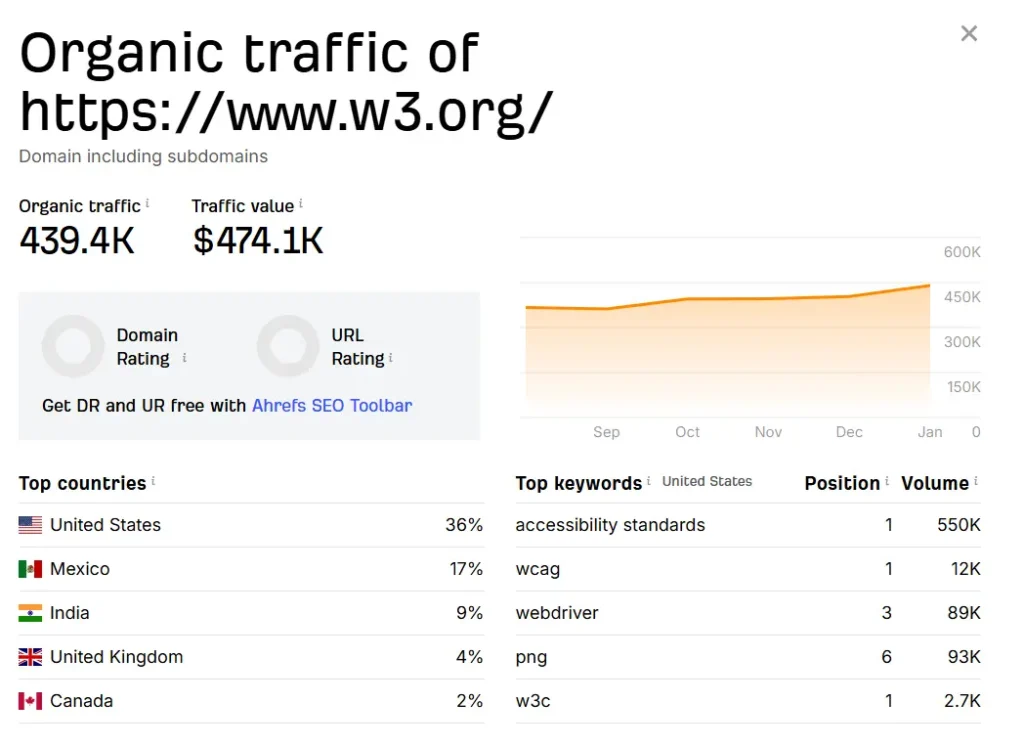
Here i have given an image in which you can see how much a small website of invoice maker tool is eaning per month if you want to see this website then go to this link- W3c validator tool
⭐ How Much Can You Earn?
If you build a good W3C Validator Tool and promote it properly, you can earn money in multiple ways at the same time.
Average Monthly Earning Potential:
- AdSense: $200 – $500
- Affiliate Marketing: $300 – $1,000
- Services: $200 – $1,500
- Premium features: $100 – $500
- SaaS / API: $200 – $2,000
Total Income Potential:
💰 $1,000 to $5,000+ per month
The earning potential increases as your tool gains more users.
Best Practices When Using W3C Validator
- Don’t panic if you see many errors start fixing them one by one
- Focus on critical errors first, then warnings
- Revalidate after every major website update
- Combine validation with speed and SEO tools
Limitations of the W3C Validator Tool
While powerful, the tool does not:
- Check content quality
- Analyze backlinks
- Replace SEO tools like Search Console
- Guarantee higher rankings on its own
It should be used as a technical foundation tool, not a complete SEO solution.
❓ Frequently Asked Questions (FAQs)
1. What is a W3C Validator Tool?
A W3C Validator Tool is an online tool that checks whether a website’s HTML and CSS code follows official web standards set by the World Wide Web Consortium. It helps identify errors, warnings, and code issues that may affect SEO, speed, and browser compatibility.
2. Can I really earn money from a W3C Validator Tool?
Yes, absolutely. You can earn money through multiple methods such as Google AdSense, affiliate marketing, selling premium features, offering website fixing services, selling API access, or turning your tool into a SaaS product.
3. How much traffic is required to earn from a validator tool?
Even 5,000–10,000 monthly visitors can generate income through ads and affiliates. As traffic grows, earning potential increases significantly, especially with premium features and services.
4. Do I need advanced coding skills to build a W3C Validator Tool?
Not necessarily. You can start with a basic validator using HTML, CSS, and JavaScript. For advanced features, learning Node.js and HTML parsing libraries will be helpful, but beginners can start small and grow step by step.
5. Is it legal to create my own W3C-style validator tool?
Yes, it is legal to create your own validator tool. However, you should not copy W3C’s branding or claim your tool is an “official W3C tool.” You can create a W3C-like or HTML validator tool with your own branding.
6. Can I use Google AdSense on a validator tool website?
Yes. Validator tools are content-based utility websites, which are usually AdSense-friendly, as long as your site follows Google’s content and policy guidelines.
7. What premium features can I sell in a validator tool?
You can sell features like:
- Advanced SEO audits
- Accessibility checking
- CSS optimization
- PDF report downloads
- Unlimited validations
- API access
- Priority processing
These features work well with monthly or yearly subscriptions.
8. Who is the target audience for a W3C Validator Tool?
Your main audience includes:
- Website owners
- Bloggers
- Web developers
- SEO professionals
- WordPress users
- Freelancers
- Students learning web development
This makes the tool highly scalable.
Conclusion: Why the W3C Validator Tool Is a Must for Every Website
The W3C Validator Tool is not just a developer utility it is a website quality assurance tool. In a digital world where SEO, speed, and user experience decide success, ignoring code validation is a big mistake.
By using the W3C Validator Tool, you ensure that:
- Your website follows global web standards
- Your code is clean, efficient, and professional
- Your website loads faster
- Your SEO foundation is strong
- Your users enjoy a smooth browsing experience
In simple terms, a validated website is a trusted website trusted by users, browsers, and search engines.
If you truly want to improve SEO, boost speed, and build a future-ready website, the W3C Validator Tool should be part of your regular website maintenance routine.
